Between a product page and an order, the classic journey lines up four screens: the cart, the address, delivery, payment. Four screens, four chances to put the purchase off until later.
Yet on mobile, the phone already knows the customer’s address, name and card. The only thing missing is a button.
Between April and October 2026 we reworked that last mile: Apple Pay Express right on the product page, address validation that knows when to stay quiet because Google is down, a pay-in-instalments widget that costs nothing at page load, and richer 3-D Secure data so that banks stop putting our loyal customers through strong authentication. Here is how.
The prerequisite: an Apple Pay that shows up
The story starts with a bug, late January, on the old site. Apple Pay vanished from the list of payment methods, with no error anywhere.
To know which methods to offer, Magento asks Adyen with an indicative amount. Ours was zero. Adyen does not return Apple Pay for a zero-euro transaction: the method was simply filtered out upstream. Replacing a 0 with 100 (one euro, in cents) was enough.
The lesson fits in one line and it served us for the rest of the project: in a payment chain, silent behaviour is almost always a provider’s business rule you did not know about. Same logic in April: an inconsistency in payment notifications led us to upgrade Magento’s Adyen module from v9.6 to v9.20, on Adyen’s recommendation, with a full test pass (cards, 3-D Secure, webhooks, refunds, alternative methods) before stacking new journeys on top of it.
Apple Pay Express from the product page
On 23 April the Apple Pay button landed on the product page, right under “add to cart”.
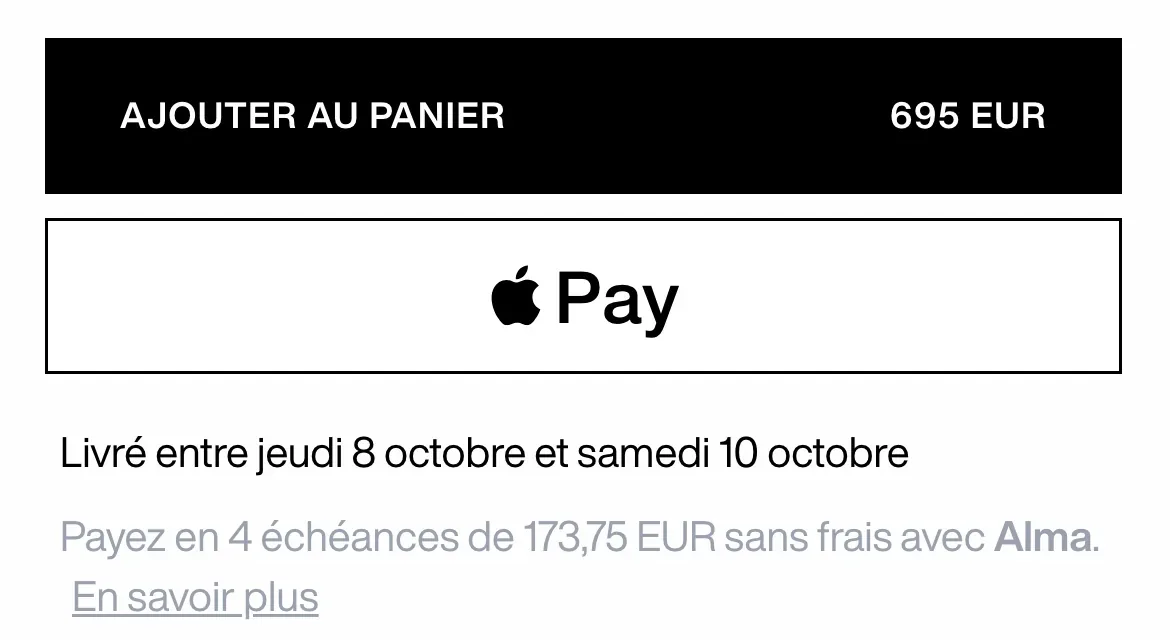
It does not show up everywhere, on purpose. It needs a compatible device (checked on the client, never during server rendering), a configurable product, a price above a per-country threshold (€300 in Europe, none in the United States), and a market whose checkout is not delegated to our cross-border partner. The threshold is a business decision: on a small item the cart remains the right tool, and we do not want the shortcut to drag the average basket down. On a statement piece, the customer knows what she wants.
A cart built on the fly
Apple Pay Express is not magic on the commerce side: Magento needs a cart to create an order. The real work was deciding which cart.
Three cases come up on click:
- the cart is empty, or already holds exactly this product in this size: we add it if needed and open the payment straight away;
- the cart holds something else: a panel asks whether to pay for the whole cart or this product only, and warns explicitly that the current cart will be emptied in the second case;
- the product is already part of a bigger cart and the customer picks “the whole cart”: we must not add it again, otherwise Magento bumps the quantity and the Apple Pay sheet charges for two coats instead of one.
That last case was caught before going live. A related bug was caught at the same time: matching was first done on the size label. Two variants of different colours share the same “M” label, so the fast path could open the payment on a cart holding the wrong colour. We now compare the variant SKU, never a label.
const cartHasOnlyThisProduct = (product: CatalogProduct, variantSku?: string): boolean => {
  const currentItems = items.value ?? []
  if (currentItems.length !== 1) return false
  const single = currentItems[0]
  if (!single || single.quantity !== 1) return false
  if (single.product?.sku !== product.sku) return false
  // a size label is not unique across colours: only the variant SKU identifies the purchase
  return Boolean(variantSku) && single.product?.child_sku === variantSku
}
Before the Apple Pay sheet, one last panel shows the terms of sale and the GDPR notice. The shortcut does not waive legal obligations, it just makes them quicker to read.
What the Apple Pay sheet knows, and what it will not tell
Once the sheet is open, the conversation with Apple is event-driven. The most interesting event is the address change: to protect the customer’s privacy, Apple only hands over a redacted address until Face ID is passed. City, postcode, country. No street, no name.
Yet this is exactly when we must display shipping methods and the exact total. So we set an address flagged as partial on the cart, just enough for Magento to compute shipping costs, and send methods and amounts back to the sheet.
After Face ID we receive the full address. We validate it again in full before starting the payment: nothing has been charged yet, so rejecting at this point costs the customer nothing.
Validating an address we cannot see yet
Our classic checkout already relies on Google’s Address Validation API to check the delivery zone: postcode, city, country. On 16 June we plugged it into Apple Pay Express, with one big difference.
Google grades every address component by confidence level. The classic checkout accepts “confirmed” and “unconfirmed but plausible”, so that a typo in a street name never blocks a customer. Apple Pay Express requires “confirmed”. The “plausible” level lets through city and postcode pairs that do not exist, and with no visible address step the customer would have no chance to notice before delivery.
We added two rules along the way:
- a component replaced by Google is a rejection. If Google silently corrects a wrong postcode into a real one, the address typed does not match reality: the customer should fix it, not us;
- in the United States the postal service has the last word, but only when it confirms the delivery point. On an undeliverable address, USPS standardisation still echoes the postcode typed, which must never raise the confidence level.
In the code, the zone validation and the shipping methods query run in parallel so the sheet never waits:
const [methods, deliveryZoneValidation] = await Promise.all([
  fetchShippingMethodsByCountry(countryCode || '', true),
  validateDeliveryZone(event.shippingContact),
])

if (!deliveryZoneValidation.isValid && deliveryZoneValidation.error) {
  // Apple Pay keeps the sheet open and lets the customer pick another address
  resolveWithContactError(resolve, deliveryZoneValidation.error)
  return
}
When Google goes down: a breaker that lets customers through
The first policy was cautious, and it had a hidden cost. When the Google call failed, the catch returned “invalid address”, without telling an outage from a rejection. A Google outage would have meant, for its whole duration, customers with perfectly valid addresses being told otherwise, at checkout as well as in Apple Pay.
In September we changed the policy with a circuit breaker, modelled on the one that already protects our search engine. It applies to every caller, the address form and Apple Pay Express alike.
The subtlety lies in what counts as a failure. Only a genuine Google outage counts: no response, a timeout, a 5xx. A legitimate rejection (the address does not exist) is not a failure, it is the service doing its job. Neither is a 4xx, a rejected key for instance: counting it would let the breaker switch validation off for everyone and hide a configuration problem we want to see immediately.
catch (error) {
  const status = (error as { statusCode?: number }).statusCode ?? 0
  if (status === 0 || status >= 500) {
    const failures = validationBreaker.value.failures + 1
    validationBreaker.value = failures >= validationBreakerThreshold
      ? { failures: 0, openUntil: Date.now() + validationBreakerCooldownMs }
      : { failures, openUntil: 0 }
  }
  throw error
}
Three consecutive failures open the circuit for thirty seconds, and an answer from Google closes it. The state lives in a useState, not in a module variable: a rule the Nuxt migration taught us the hard way, since global state on the server leaks from one request to the next.
Letting an unverified address through is only acceptable because nothing is lost. The storefront never decides that an address is verified: Magento sets that status, at shipment. An address accepted during an outage stays unverified and is handled as such. Fail-open for the customer, without ever lying in the data. The trade-off is deliberate: during those thirty seconds, Apple Pay’s strict check goes down too.
Alma: pay in instalments without weighing the page down
On 18 June we replaced PayPal’s pay-later message on the French product page with Alma, then extended the widget to Spain in August.
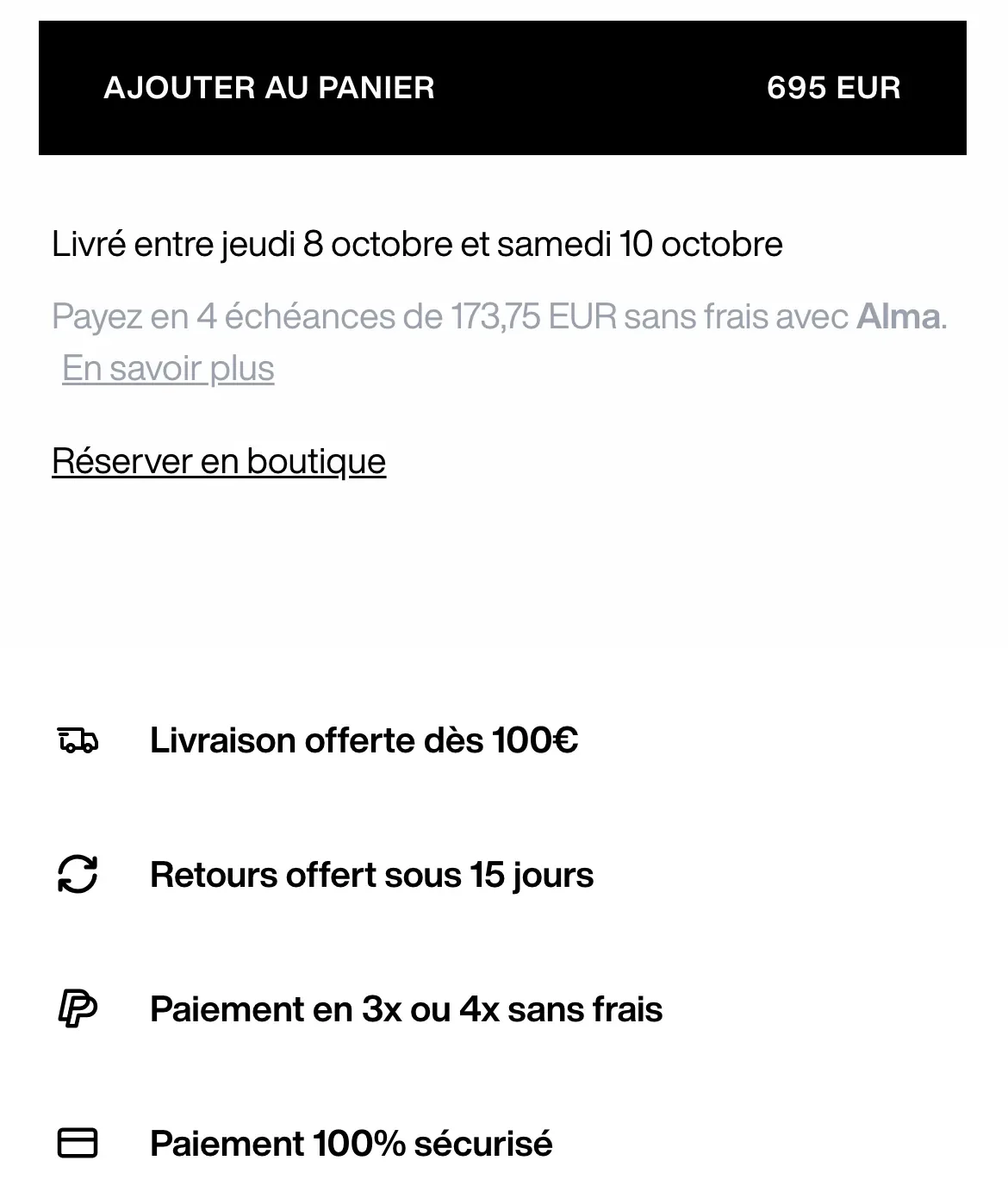
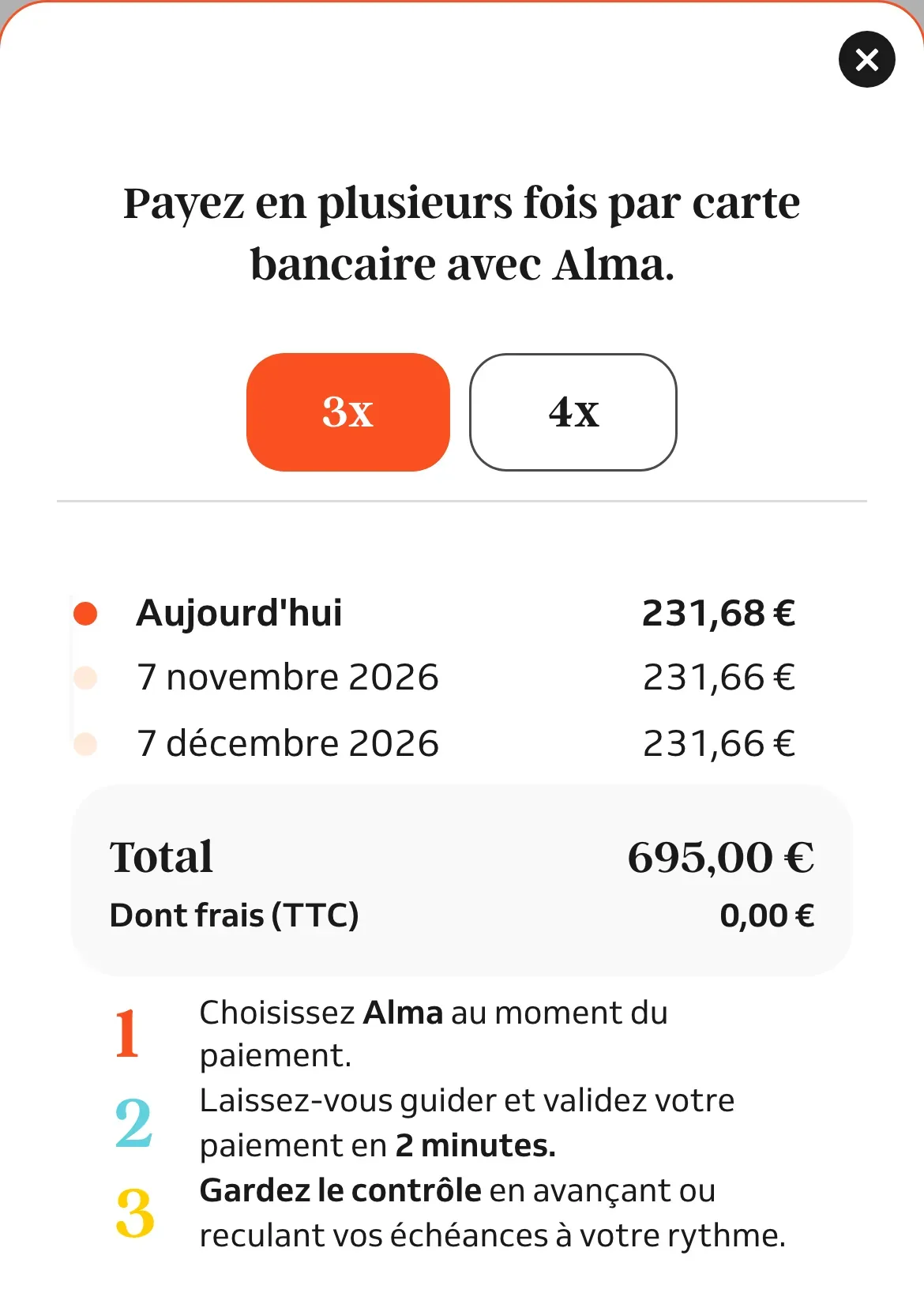
The most important technical choice is invisible. Alma’s SDK does not load with the page. The “pay in 4 instalments” line is rendered by our own component, with the amount computed on our side. The third-party script only arrives on the first click on “Learn more”, thanks to useScript in manual mode:
const sdkScript = useScript(
  { src: `${ALMA_WIDGETS_CDN_BASE}/widgets.umd.js`, async: true },
  { trigger: 'manual' },
)

sdkScript.onLoaded(() => {
  // the SDK may finish loading after an SPA navigation away from this product
  if (disposed) return
  mountAndOpen(container, requestedAmount)
})
The result: zero bytes of third-party JavaScript on the product page until the customer shows interest in paying in instalments. The disposed guard handles a case only a single-page application knows: if the SDK finishes loading after the customer has navigated to another product, the window would open with the previous product’s amount.
This work comes with a discreet reassurance item, added in April on every market except the United States: “100% secure payment”, next to delivery and returns.
3-D Secure: telling the bank who a loyal customer is
The last piece shipped in early October, and it is the least visible of all. With 3-D Secure 2, the customer’s bank decides whether to authenticate frictionlessly or to trigger a challenge (SMS code, approval in the banking app). It decides based on the signals we send. The less we say, the more it challenges.
Cartes Bancaires, the leading payment method in France, asked through Adyen that every payment carry a specific set of shopper data. We audited our code field by field: real customer IP, addresses, email, phone, risk indicators, everything was already sent. Except one: the age of the customer account. A Magento plugin on Adyen’s customer data builder now adds it to every payment:
private function getAccountAgeIndicator(DateTime $createdAt): string
{
    $now = $this->dateTimeFactory->create();
    $ageInDays = $now->diff($createdAt)->days;

    return match (true) {
        $now->getTimestamp() - $createdAt->getTimestamp() < self::THIS_TRANSACTION_MAX_AGE_SECONDS
            => AccountInfo::ACCOUNT_AGE_INDICATOR_THIS_TRANSACTION,
        $ageInDays < 30 => AccountInfo::ACCOUNT_AGE_INDICATOR_LESS_THAN30_DAYS,
        $ageInDays <= 60 => AccountInfo::ACCOUNT_AGE_INDICATOR_FROM30_TO60_DAYS,
        default => AccountInfo::ACCOUNT_AGE_INDICATOR_MORE_THAN60_DAYS,
    };
}
A guest is declared “not applicable”, an account created during checkout is declared as such, and pay-by-link is excluded: the customer is not paying from her account there. Sixty lines, no UI, and a long-standing customer who is more likely to be spared opening her banking app to buy a coat.
What we learned
- Express payment is a cart problem, not a button problem. The Apple Pay button takes an hour. Deciding which cart to charge, without ever billing an unexpected quantity or colour, took most of the development time.
- Design for the data your provider refuses to give. Apple’s redacted address forces a double validation: on what we know before Face ID, then on everything after.
- Fail-open has to be earned. Letting customers through when a third party fails is only safe if the data stays honest downstream. And a breaker that counts the wrong errors is worse than no breaker at all.
- Load third-party scripts on intent, not on page load. The lightest widget is the one that does not exist until someone asks for it.
- Some of the best wins are invisible. Nobody will see the account age we send to the bank; it is what may spare a loyal customer a challenge.